339 views
owned this note
# Term Project SPR26 T12 | SQL Island Evolved: Mastery of Standardized Graph Queries through Play
_Group T12: Thomas Elsensohn, Ana Krstevska, Marko Miletic, Piotr Salustowicz, Tran Si Ben_
This is a document about extending SQLab with Standardized Graph Queries as part of the term project of MSE module Data Management of Prof. Stefan Keller in Spring 2026.
---
[TOC]
## 1. Introduction and Overview
Graph-structured data is everywhere: social networks, knowledge graphs, and supply chains all model the world as nodes and relationships. Querying such data in plain SQL requires complex self-joins, and moving to a dedicated graph database like Neo4j means learning a completely new query language.
The SQL:2023 standard [2] solves this with **SQL/PGQ (Property Graph Queries)**, which adds graph pattern matching directly to SQL. You declare a property graph over your existing tables once, and then use `GRAPH_TABLE` and `MATCH` to traverse it. The difference in readability is immediate:
```sql
-- Standard SQL: friends-of-friends via self-join
SELECT p1.name, p3.name
FROM person p1
JOIN knows k1 ON k1.src = p1.id
JOIN knows k2 ON k2.src = k1.dst
JOIN person p3 ON p3.id = k2.dst;
-- SQL/PGQ: the same query as a pattern match
FROM GRAPH_TABLE (social_graph
MATCH (a:person)-[:knows]->(b:person)-[:knows]->(c:person)
COLUMNS (a.name AS person, c.name AS friend_of_friend)
);
```
DuckPGQ [3] is a community extension for DuckDB [4] that partially implements this standard. DuckPGQ has known limitations compared to native graph databases such as Neo4j and to PostgreSQL graph extensions; a detailed comparison is in Appendix E. DuckPGQ works on top of ordinary tables but graph is read-only.
This paper explores SQL/PGQ through a gamified tutorial inspired by SQL Island. Section 2 introduces the SQL Island format, Section 3 explains the theory behind SQL/PGQ and DuckPGQ, Section 4 presents the graph challenges, and Section 5 concludes with our findings.
## 2. SQLab and DuckDB – A Game for Learning SQL
This chapter covers the technical environment: **SQLab** as the adventure builder, **DuckDB** as the execution engine, and how to reproduce the local CLI version with Docker.
The project does not use the original SQL Island platform. The adventure is built with SQLab and played through DuckDB. SQLab stores the adventure inside a database together with the dataset, helper functions, encrypted messages, and progression logic — embedding the learning game into a database workflow while keeping SQL Island's episodic, task-driven structure.
<p style="text-align:center;">
<img src="https://md.coredump.ch/uploads/cf4ada5d-10c9-4592-90da-657fecd9c4dc.svg" width="500">
</p>
<p style="text-align:center;"><em>SQLab logo.</em></p>
The learning principle is similar to SQL Island: the player receives a task, writes an SQL query, checks the result, and proceeds. In SQLab, progression is controlled through **tokens** — a correct query returns a token that unlocks the next episode, linking the exercises into a continuous sequence rather than isolated problems.
The token expressions in solutions are part of SQLab's validation, not of SQL/PGQ itself. An expression like `salt_042(sum(nn(b.hash)) OVER ()) AS token` checks the submitted result and unlocks the next challenge. Students should include the provided token expression but not interpret it as graph-query syntax.
This chapter focuses on the technical framework and interface; the detailed challenge design and Knowhere narrative are in Chapter 4.
### 2.1 Obtaining the Companion Repository
To reproduce the local CLI version of the adventure, the companion repository can be cloned from GitHub:
```bash
git clone https://github.com/thomase1993/TSM-DataMgmt-SPR26-sqlab.git
cd TSM-DataMgmt-SPR26-sqlab
```
### 2.2 Requirements and Docker Setup
The repository is designed around a Docker-first workflow. After cloning, students do not need to install DuckDB, Python packages, or SQLab manually — Docker is the only local runtime requirement for the CLI.
On first run, the container may need network access to install or load the DuckPGQ extension. Once the image is built and the extension available, the adventure can be created and played through the SQLab shell. Build the image with:
```bash
docker build -t sqlab .
```
Students do **not** need to launch DuckDB manually; the image already starts SQLab with the correct entry point.
### 2.3 Running the CLI Version
For the CLI, the recommended path is the wrapper script from the repository root, which runs the SQLab Docker container with the correct mounted adventure directory:
```bash
bash sqlab.sh wd/knowhere create
bash sqlab.sh wd/knowhere shell
```
`create` builds (or rebuilds) the adventure: it applies the schema, loads the dataset, installs the SQLab helpers, and writes generated files such as `output/dump.sql`. `shell` opens the SQLab interactive shell for the generated DuckDB adventure.
Inside the shell, the first episode is opened with the initial token:
```sql
42;
```
Students then work entirely inside the shell. The current episode — statement and required token formula — is shown directly in the terminal.
### 2.4 Interface and Gameplay Flow in the CLI
The CLI presents the game directly inside the SQL shell. Instead of a graphical start screen, the player sees the story text, task, and token formula in the terminal. The interaction model stays close to ordinary database work: read the current episode, write a query, check the result, and progress automatically when the correct token is produced.
<p style="text-align:center;">
<img src="https://md.coredump.ch/uploads/e95c4ac7-743f-4223-99fb-11038a420e03.png" width="1000">
</p>
<p style="text-align:center;"><em>Figure 2.1: Start of the SQLab adventure in the DuckDB CLI. The shell starts from Docker, the first episode opens with `42`, and the first task appears in the terminal.</em></p>
The game begins as a text-based episode rather than a separate menu-driven interface.
<p style="text-align:center;">
<img src="https://md.coredump.ch/uploads/9c7def73-e3a9-4d22-aa1e-fbb02b51a954.png" width="1000">
</p>
<p style="text-align:center;"><em>Figure 2.2: Query execution in the DuckDB CLI. The screenshot shows a correct SQL solution, the returned rows with the token column, and the next episode appearing immediately below.</em></p>
If the query is correct, SQLab returns the token in the result and immediately prints the next episode below the table. The gameplay loop is: mission text, SQL query, result with token, next episode.
This chapter documents the CLI as the main execution mode. The browser-based Web GUI runs the same adventure logic through a graphical interface and is documented in Appendix F.
### 2.5 Narrative Context of the Adventure
The adventure is framed as an investigation in the black market colony of Knowhere. The player must identify brokers, inspect trade relationships, and later model these relationships as a graph to find missing ship parts — a narrative reason for moving from ordinary relational queries to graph-oriented ones. The full storyline, challenge structure, and SQL/PGQ tasks are in Chapter 4.
---
## 3. What are Standardized Graph Queries?
SQL/PGQ is the property-graph query extension introduced in SQL:2023. It allows graph structures to be declared over existing relational tables and queried using graph patterns. In this project, SQL/PGQ is used through the **DuckPGQ** community extension for DuckDB.
DuckPGQ supports the SQL/PGQ style of syntax, including `CREATE PROPERTY GRAPH`, `GRAPH_TABLE`, `MATCH`, graph labels, edge labels, node and edge properties, and path-finding constructs such as `ANY SHORTEST`. At the same time, students should remember that DuckPGQ is an implementation of the standard for DuckDB, not the standard itself. Some behavior and supported features depend on the DuckPGQ implementation version. For example, DuckPGQ supports `ANY SHORTEST` path queries, while other SQL/PGQ path modes may not be available in the same way.
This section covers the mechanics: how graphs are declared over existing tables, and how `GRAPH_TABLE` and `MATCH` are used to query them.
Two key constructs are used:
- **MATCH** – defines graph patterns
- **GRAPH_TABLE** – returns the matched patterns as relational results

*Figure: A small graph showing persons connected by relationships.*
### 3.1 Graph Representation in Relational Databases
Graph queries operate on graph structures, but the underlying data can remain in **relational tables**.
A graph is commonly represented using two types of tables:
**Node Table**
| id | name |
|----|------|
| 1 | Alice |
| 2 | Bob |
| 3 | Charlie |
**Edge Table**
| source_id | target_id | relationship |
|-----------|-----------|-------------|
| 1 | 2 | friend |
| 2 | 3 | friend |
The node table represents vertices, while the edge table represents relationships between those vertices. Each edge stores a source identifier and a target identifier, which together describe the direction of the relationship.
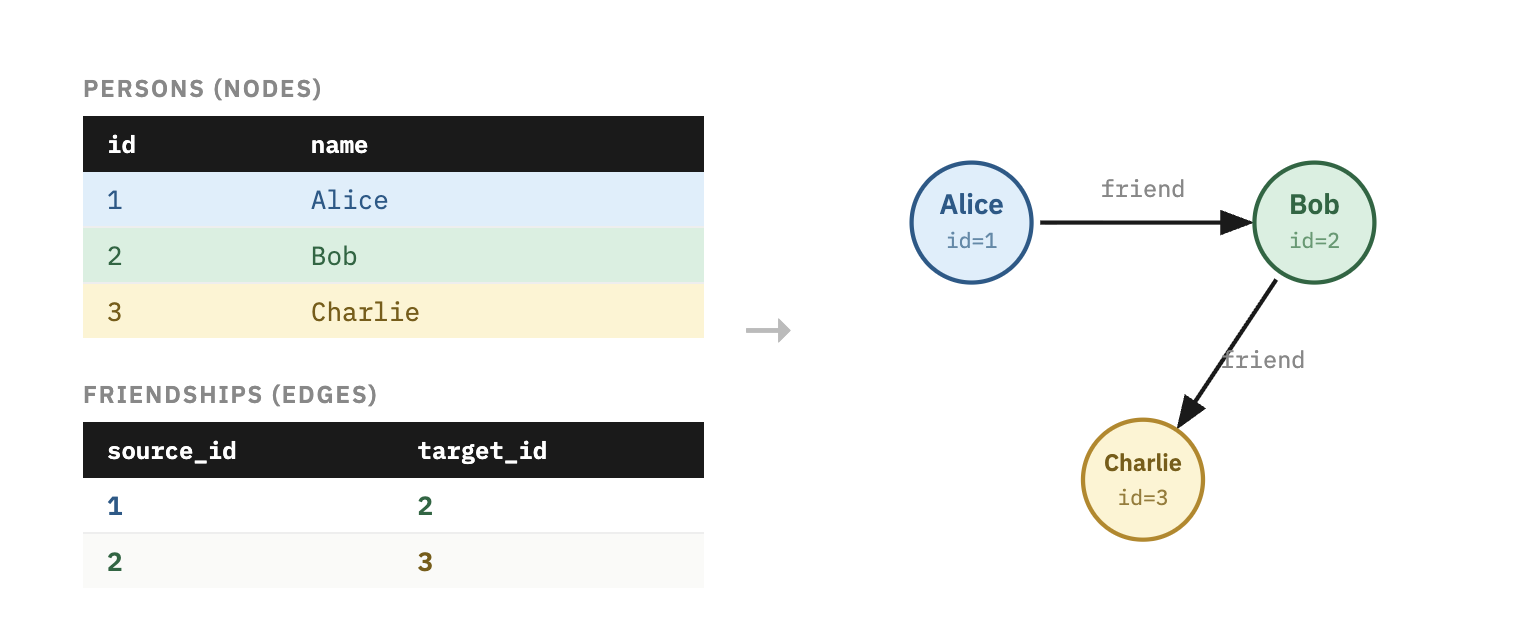
*Figure: Relational tables mapped to a graph.*
### 3.2 Declaring a Property Graph with DuckPGQ
Before querying, the graph must be declared using `CREATE PROPERTY GRAPH`. This statement tells DuckDB which tables act as vertices and which tables act as edges, including the key relationships between them.
```sql
LOAD 'duckpgq';
CREATE OR REPLACE PROPERTY GRAPH social_graph
VERTEX TABLES (persons)
EDGE TABLES (
friendships
SOURCE KEY (source_id) REFERENCES persons (id)
DESTINATION KEY (target_id) REFERENCES persons (id)
);
```
This declaration does not require copying the data into a separate graph database. It defines a graph layer over existing tables. After the graph has been declared, it can be queried repeatedly with `GRAPH_TABLE`.
### 3.3 SQL Graph Query Syntax
Standardized graph queries introduce SQL constructs for **pattern matching on graph data**.
The two central components are:
| Component | Description |
|-----------|------------|
| MATCH | Defines the graph pattern to search for |
| GRAPH_TABLE | Converts graph matches into relational rows |
These features allow graph queries to be integrated with traditional SQL operations. Once the graph match has been returned as a table, the result can be filtered, ordered, joined, or aggregated like any other SQL result.
### 3.4 MATCH Clause
A simple graph pattern has the following form:
```text
(a)-[e]->(b)
```
This represents a directed relationship from node `a` to node `b` through edge `e`.
More complex patterns can traverse multiple relationships:
```text
(a)-[e1]->(b)-[e2]->(c)
```
This describes a path from `a` to `c` through the intermediate node `b`.
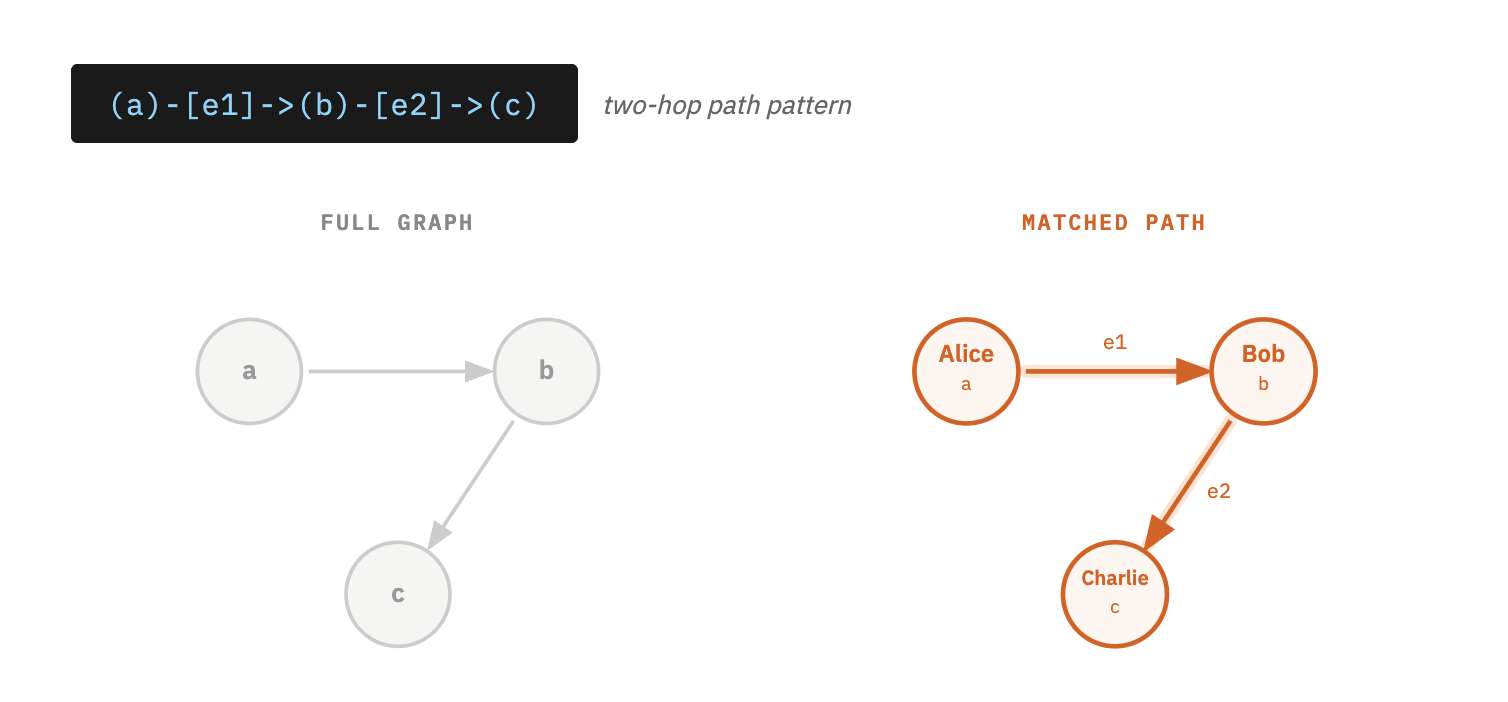
*Figure: Pattern matching example showing nodes A → B → C.*
### 3.5 GRAPH_TABLE Operator
The **`GRAPH_TABLE` operator** evaluates graph patterns and returns the matches as a relational table.
General syntax:
```sql
SELECT *
FROM GRAPH_TABLE(
graph_name
MATCH (a)-[e]->(b)
COLUMNS (
a.name AS source,
b.name AS target
)
);
```
| Element | Description |
|---------|-------------|
| `graph_name` | The declared property graph |
| `MATCH` | The graph pattern to search |
| `COLUMNS` | The output attributes returned as columns |
Each matched pattern produces one row in the result table. This is important for SQL users because the graph result can still be processed with ordinary SQL operations.
### 3.6 Example Graph Query
Consider the following tables.
**persons**
| id | name |
|----|---------|
| 1 | Alice |
| 2 | Bob |
| 3 | Charlie |
**friendships**
| source_id | target_id |
|-----------|-----------|
| 1 | 2 |
| 2 | 3 |
The following query returns connected persons:
```sql
SELECT *
FROM GRAPH_TABLE(
social_graph
MATCH (p1)-[f]->(p2)
COLUMNS (
p1.name AS person1,
p2.name AS person2
)
);
```
**Result**
| person1 | person2 |
|--------|--------|
| Alice | Bob |
| Bob | Charlie|
## 4. SQL Island: The Sequel - Knowhere Black Market
**Theme:** Weighted Graph / Cheapest Route
Your ship, the **Milano**, barely survived the crash.
The engines are dead, the navigation system is fried, and the hyperdrive core is missing a crucial stabilizer.
Floating in the wreckage of your cockpit, you pick up a weak signal.
> “Distress beacon detected. Coordinates: Knowhere.”
You set the emergency thrusters and drift toward the strange celestial object.
Soon you realize what it is: **Knowhere**, a mining colony carved inside the skull of an ancient celestial. The place is notorious across the galaxy for its **black markets, smugglers, and traders**.
If anyone can get you the parts you need, it’s the brokers of Knowhere.
But there’s a catch.
No one here sells parts directly.
Everything moves through a **web of broker-to-broker trades**.
To repair the Milano, you must acquire three rare components:
- **Ion Thruster**
- **Plasma Regulator**
- **Quantum Flux Coil**
Some brokers possess the parts.
Others simply trade them between each other.
Each trade costs **units**, and your credits are limited.
To escape Knowhere, you must learn how the **trade network works**.
### 4.1 Challenge 1 – The Brokers of Knowhere
Your ship, the **Milano**, barely survived the crash. The engines are dead, the navigation system is fried, and the hyperdrive core is missing a crucial stabilizer.
A distress signal leads you to **Knowhere**, a black market colony carved inside the skull of an ancient celestial. If anyone can help you find the missing parts, it is the brokers who trade across this underground network.
A Ravager mechanic named **Rax** hands you access to the broker registry.
> "Start there. Figure out who's who in this mess."
We are going to start simple, just classic SQL to warm up the coding muscles. No graphs, no fancy traversals yet. A clean SELECT is all you need here. From here the queries will gradually get more complex, so consider this your stretching session before the real workout begins.
One more thing you need to know before you start: this game uses a **hashing mechanism** to unlock the next level. Every correct query you write must include a `token` column, computed using a salt function applied to a hash of the result rows. It looks like this:
```sql
salt_042(sum(nn(b.hash)) OVER ()) AS token
```
Breaking that down:
- `b.hash` is a hidden value attached to each row
- `nn()` makes sure nulls are handled safely
- `sum(...) OVER ()` accumulates it across all rows
- `salt_042(...)` encodes it into the token the game uses to verify your answer and unlock the next challenge
The formula is always provided for you — just make sure it is included in your SELECT.
<details>
<summary style="font-weight: bold; color: #00fe82;">Task Challenge 1 📋</summary>
List all brokers and the parts they currently possess.
</details>
<details>
<summary style="font-weight: bold; color: #007bff;">Hint Challenge 1 💡</summary>
You do not need a graph query yet. The brokers are stored in a normal table called `brokers`. Select the `name` and `part` columns from that table. Do not forget to include the token formula in your SELECT.
</details>
<details>
<summary style="font-weight: bold; color: #FF474C;">Solution Challenge 1 🏅</summary>
```sql
SELECT b.name, b.part, salt_042(sum(nn(b.hash)) OVER ()) AS token
FROM brokers b;
```
</details>
----
### 4.2 Knowledge Upgrade – Mapping the Black Market
After reviewing the broker registry, Rax pulls up a hidden market map and grins.
> "The brokers are not just a list. They are a network. Every trade is a connection."
The broker data has already been wired up into a property graph called **trade_graph**. Brokers are the vertices and trades are the edges between them.
Rax taps the map.
> "Take a look. See who is connected to whom."
Before you start querying, make sure the graph extension is loaded:
```sql
LOAD duckpgq;
```
This is your first graph query. Instead of reading from a plain table, you will use `GRAPH_TABLE` to traverse the network directly. The `MATCH` clause describes the pattern you are looking for, in this case, a broker connected to another broker via a trade edge.
<details>
<summary style="font-weight: bold; color: #00fe82;">Task Knowledge Upgrade 📋</summary>
View the trade network by listing all direct broker connections in the graph.
</details>
<details>
<summary style="font-weight: bold; color: #007bff;">Hint Knowledge Upgrade 💡</summary>
Use `GRAPH_TABLE` with the graph name `trade_graph`. Write a `MATCH` pattern like `(a:Broker)-[t:TRADES_WITH]->(b:Broker)` to follow edges between brokers. In the `COLUMNS` clause, return `a.name` and `b.name` to see who connects to whom. Note: every edge in the pattern must have a variable name, so make sure to include `t` in `[t:TRADES_WITH]`.
</details>
<details>
<summary style="font-weight: bold; color: #FF474C;">Solution Knowledge Upgrade 🏅</summary>
```sql
SELECT from_broker, to_broker, salt_012(sum(nn(t_hash)) OVER ()) AS token
FROM GRAPH_TABLE (
trade_graph
MATCH (a:Broker)-[t:TRADES_WITH]->(b:Broker)
COLUMNS (
a.name AS from_broker,
b.name AS to_broker,
t.hash AS t_hash
)
);
```
</details>
---
### 4.3 Challenge 2 – Following the Trades
You can see the connections now. But connections alone won't get you the parts you need.
Rax crosses his arms.
> "Every trade costs credits. If you want to survive in this market, pay attention to the cost."
He pulls up a base query and slides it across the console.
> "Here's where you left off. It shows you who trades with whom. But it's missing something important."
```sql
SELECT from_broker, to_broker
FROM GRAPH_TABLE (
trade_graph
MATCH (a:Broker)-[t:TRADES_WITH]->(b:Broker)
COLUMNS (
a.name AS from_broker,
b.name AS to_broker
)
);
```
Rax taps the screen.
> "Every one of those arrows has a price tag on it. Find it."
<details>
<summary style="font-weight: bold; color: #00fe82;">Task Challenge 2 📋</summary>
List all broker-to-broker trades and include the cost of each trade.
</details>
<details>
<summary style="font-weight: bold; color: #007bff;">Hint Challenge 2 💡</summary>
You already know how to match broker connections from the Knowledge Upgrade. Now add the edge cost: the edge variable `t` in `[t:TRADES_WITH]` gives you access to edge properties. Return `t.cost` in the `COLUMNS` section alongside the broker names.
</details>
<details>
<summary style="font-weight: bold; color: #FF474C;">Solution Challenge 2 🏅</summary>
```sql
SELECT from_broker, to_broker, cost,
salt_078(sum(nn(hash) + cost) OVER ()) AS token
FROM GRAPH_TABLE (
trade_graph
MATCH (a:Broker)-[t:TRADES_WITH]->(b:Broker)
COLUMNS (
a.name AS from_broker,
b.name AS to_broker,
t.cost AS cost,
a.hash
)
);
```
</details>
---
### 4.4 Challenge 3 – The Ion Thruster Lead
You overhear a conversation in the market.
> “Kraglin’s looking for an Ion Thruster again.”
> “Yeah, but he doesn’t have one. He trades with someone who does.”
Rax smirks.
> “Follow the credits, kid. The cheapest deal usually points to the real supplier.”
<details> <summary style="font-weight: bold; color: #00fe82;">Task Challenge 3 📋</summary>
Find the cheapest direct trade leading to a broker who has the Ion Thruster.
</details> <details>
<summary style="font-weight: bold; color: #007bff;">Hint Challenge 3 💡</summary>
Filter on the destination broker inside `GRAPH_TABLE` using `WHERE b.part = 'Ion Thruster'`.
Placing the `WHERE` clause inside the `GRAPH_TABLE` function filters nodes during the graph traversal itself, which is clearer than filtering the resulting table afterward. You could write the condition outside and get the same rows, but the graph engine would first traverse the edges and only then discard the rows that do not match the part condition.
Once filtered, sort by trade cost and keep only the cheapest row with `ORDER BY cost` and `LIMIT 1`.
</details>
<details> <summary style="font-weight: bold; color: #FF474C;">Solution Challenge 3🏅</summary>
```sql
SELECT seller, supplier, cost, seller_hash, supplier_hash,
salt_010((nn(seller_hash) + nn(supplier_hash))/2) AS token
FROM GRAPH_TABLE (
trade_graph
MATCH (a:Broker)-[t:TRADES_WITH]->(b:Broker)
WHERE b.part = 'Ion Thruster'
COLUMNS (
a.name AS seller,
b.name AS supplier,
t.cost AS cost,
a.hash AS seller_hash,
b.hash AS supplier_hash
)
)
ORDER BY cost
LIMIT 1;
```
</details>
----
### 4.5 Challenge 4 – The Middleman Problem
Unfortunately, things are never simple in Knowhere.
Rax studies the results and shakes his head.
> “Too expensive.”
> “If you want a better price, you gotta go through a middleman.”
In the black market, parts often move through chains of brokers before reaching the final buyer.
Example trade chain:
Broker A -> Broker B -> Broker C
The middle broker usually takes a cut, but sometimes a longer route still costs less overall.
<details> <summary style="font-weight: bold; color: #00fe82;">Task Challenge 4 📋</summary>
Find two-step trade routes that lead to a broker with the Plasma Regulator.
</details> <details> <summary style="font-weight: bold; color: #007bff;">Hint Challenge 4💡</summary>
You need to follow two trades in a row. Your pattern should look like a chain:
(a)-[t1]->(b)-[t2]->(c)
The final broker c must have the part 'Plasma Regulator'. To compute the full price of the route, add the two trade costs: t1.cost + t2.cost.
</details> <details> <summary style="font-weight: bold; color: #FF474C;">Solution Challenge 4🏅</summary>
```sql
SELECT start, middleman, supplier, total_cost,
salt_080(sum(nn(a_hash) + nn(b_hash) + nn(c_hash)) OVER ()) AS token
FROM GRAPH_TABLE (
trade_graph
MATCH (a:Broker)-[t1:TRADES_WITH]->(b:Broker)-[t2:TRADES_WITH]->(c:Broker)
WHERE c.part = 'Plasma Regulator'
COLUMNS (
a.name AS start,
b.name AS middleman,
c.name AS supplier,
t1.cost + t2.cost AS total_cost,
a.hash AS a_hash,
b.hash AS b_hash,
c.hash AS c_hash
)
)
ORDER BY total_cost;
```
</details>
---
### 4.6 Challenge 5 – The Flux Coil Trail
A frantic trader shoves past you.
> “Flux coil just moved through the market!”
The Quantum Flux Coil is rare, volatile, and constantly changing hands.
Rax nods toward the graph.
> “Track the brokers connected to whoever holds it. That's your supply chain.”
<details> <summary style="font-weight: bold; color: #00fe82;">Task Challenge 5 📋</summary>
Find brokers connected to the broker holding the Quantum Flux Coil.
</details> <details> <summary style="font-weight: bold; color:
#007bff;">Hint Challenge 5💡</summary>
Start from a broker connected by one trade to another broker. Use a pattern like
(a:Broker)-[t:TRADES_WITH]->(b:Broker)
Then filter the second broker with b.part = 'Quantum Flux Coil' to find who trades directly with the current holder.
</details> <details> <summary style="font-weight: bold; color:
#FF474C;">Solution Challenge 5🏅</summary>
```sql
SELECT broker, coil_holder, salt_023(sum(nn(a_hash)) OVER ()) AS token
FROM GRAPH_TABLE (
trade_graph
MATCH (a:Broker)-[t:TRADES_WITH]->(b:Broker)
WHERE b.part = 'Quantum Flux Coil'
COLUMNS (
a.name AS broker,
b.name AS coil_holder,
a.hash AS a_hash
)
);
```
</details>
----
### 4.7 Challenge 6 – The Cheapest Route
You finally know where the Ion Thruster is located. But the direct trades are outrageously expensive.
Rax leans closer.
> "Listen carefully. In this market, the cheapest path is rarely the shortest."
Sometimes the best deal is direct. Sometimes it goes through one broker. Sometimes it takes two.
To afford the part, you need to compare possible trade routes and find the one with the lowest total cost.
> The documentation is like the Milano's navigation system — you only appreciate it after everything has gone catastrophically wrong and you are drifting in deep space wondering where it all went wrong.
<details>
<summary style="font-weight: bold; color: #00fe82;">Task Challenge 6 📋</summary>
Find the cheapest trade route of any length leading to a broker holding the Ion Thruster.
</details>
<details>
<summary style="font-weight: bold; color: #007bff;">Hint Challenge 6 💡</summary>
Use a recursive CTE to explore all possible trade paths without a fixed depth limit. Start by seeding each broker as its own starting point with zero cost and an empty visited list. Then recursively follow trades, accumulating cost and tracking visited broker IDs to avoid cycles:
```sql
WITH RECURSIVE paths(start_id, current_id, total_cost, visited) AS (
SELECT b.id, b.id, 0, [b.id]
FROM brokers b
UNION ALL
SELECT paths.start_id, t.target_id, paths.total_cost + t.cost, array_append(paths.visited, t.target_id)
FROM paths
JOIN trades t ON t.source_id = paths.current_id
WHERE list_position(paths.visited, t.target_id) IS NULL
)
```
Finally, join back to the `brokers` table to filter destinations where `part = 'Ion Thruster'`, sort by `total_cost`, and take the cheapest row.
</details>
<details>
<summary style="font-weight: bold; color: #FF474C;">Solution Challenge 6 🏅</summary>
```sql
SELECT start, destination, total_cost,
salt_045(sum(nn(start_hash)) OVER ()) AS token
FROM (
WITH RECURSIVE paths(start_id, current_id, total_cost, visited) AS (
SELECT b.id, b.id, 0, [b.id]
FROM brokers b
UNION ALL
SELECT paths.start_id, t.target_id, paths.total_cost + t.cost, array_append(paths.visited, t.target_id)
FROM paths
JOIN trades t ON t.source_id = paths.current_id
WHERE list_position(paths.visited, t.target_id) IS NULL
)
SELECT
b_start.name AS start,
b_end.name AS destination,
b_start.hash AS start_hash,
p.total_cost
FROM paths p
JOIN brokers b_start ON b_start.id = p.start_id
JOIN brokers b_end ON b_end.id = p.current_id
WHERE b_end.part = 'Ion Thruster'
AND p.start_id != p.current_id
ORDER BY total_cost
LIMIT 1
);
```
</details>
---
### 4.8 Challenge 7 – The Elder Roots
Groot learns that the coordinates to a hidden refuge were passed down through the oldest Flora Colossi. To find them, he must climb the living lineage one elder at a time.
Mantis whispers:
> "The memory you seek is not in the branches. It lives in the roots."
<details>
<summary style="font-weight: bold; color: #00fe82;">Task Challenge 7 📋</summary>
Find the shortest ancestral path from Groot to the elder whose title is `Keeper of Coordinates`, and return how many generations away that elder is.
</details>
<details>
<summary style="font-weight: bold; color: #007bff;">Hint Challenge 7 💡</summary>
Bind all elements in the pattern to variables and use `ANY SHORTEST` to search the lineage graph. A good starting point is:
```sql
MATCH p = ANY SHORTEST
(g:Colossus WHERE g.name = 'Groot')
-[d:DESCENDS_FROM]->*
(e:Colossus WHERE e.title = 'Keeper of Coordinates')
```
Return the number of generations with `path_length(p)`. Because the token uses a window function, alias the elder hash inside `COLUMNS` as `_hash` and apply the token formula in the outer `SELECT`.
</details>
<details>
<summary style="font-weight: bold; color: #FF474C;">Solution Challenge 7 🏅</summary>
```sql
SELECT seeker, elder, safe_world_source, generations_apart,
salt_046(sum(nn(_hash)) OVER ()) AS token
FROM GRAPH_TABLE (
groot_lineage_graph
MATCH p = ANY SHORTEST
(g:Colossus WHERE g.name = 'Groot')
-[d:DESCENDS_FROM]->*
(e:Colossus WHERE e.title = 'Keeper of Coordinates')
COLUMNS (
g.name AS seeker,
e.name AS elder,
e.world AS safe_world_source,
path_length(p) AS generations_apart,
e.hash AS _hash
)
) gt;
```
</details>
---
### 4.9 Challenge 8 – Trust No One
Rocket pulls you aside behind a crate of Yaka Arrows.
> "Sovereign spies are embedded in the network. Three brokers are feeding our route data straight to the Golden fleet. One wrong hop and we're dead."
Gamora hands you a list of compromised brokers. The flag is already in the registry.
<details>
<summary style="font-weight: bold; color: #00fe82;">Task Challenge 8 📋</summary>
Find the shortest trade path from Kraglin to the broker holding the Ion Thruster, avoiding all compromised brokers along the way.
</details>
<details>
<summary style="font-weight: bold; color: #007bff;">Hint Challenge 8 💡</summary>
First materialise a `safe_trades` table by joining trades with brokers and keeping only rows where both source and destination have `compromised = 0`. Build a `safe_trade_graph` on top of it. Then use `ANY SHORTEST` on that graph from Kraglin to the broker whose `part = 'Ion Thruster'`.
</details>
<details>
<summary style="font-weight: bold; color: #FF474C;">Solution Challenge 8 🏅</summary>
```sql
CREATE OR REPLACE TABLE safe_trades AS
SELECT t.*
FROM trades t
JOIN brokers b1 ON t.source_id = b1.id
JOIN brokers b2 ON t.target_id = b2.id
WHERE b1.compromised = 0
AND b2.compromised = 0;
CREATE OR REPLACE PROPERTY GRAPH safe_trade_graph
VERTEX TABLES (
brokers LABEL Broker
)
EDGE TABLES (
safe_trades
SOURCE KEY (source_id) REFERENCES brokers (id)
DESTINATION KEY (target_id) REFERENCES brokers (id)
LABEL TRADES_WITH
);
SELECT start, destination, hops, salt_086(sum(nn(_hash)) OVER ()) AS token
FROM GRAPH_TABLE (
safe_trade_graph
MATCH p = ANY SHORTEST
(a:Broker WHERE a.name = 'Kraglin')
-[t:TRADES_WITH]->*
(b:Broker WHERE b.part = 'Ion Thruster')
COLUMNS (
a.name AS start,
b.name AS destination,
path_length(p) AS hops,
b.hash AS _hash
)
) gt;
```
</details>
---
### 4.10 Final Scene – Escape from Knowhere
With the cheapest routes identified, the hidden coordinates recovered, and the compromised channels avoided, you secure all three parts. Rax helps you install them in the Milano. The engines roar back to life.
*"Not bad, kid."* *"You just navigated the most complicated trade network in the galaxy."*
As the Milano lifts off from Knowhere, your console flashes one final message:
> **Ship status:** Fully operational
> **Destination:** Open space
*Your adventure continues...*
*Credits roll*
## 5. Conclusion
Integrating **Standardized Graph Queries (SQL/PGQ)** into an interactive tutorial demonstrates how modern SQL features can be learned through practical exploration. In this project, we combined the theory behind SQL:2023 property graph queries with a gamified learning experience inspired by SQL Island. Using **SQLab**, **DuckDB**, and the **DuckPGQ extension**, players solve a sequence of graph-based challenges while progressing through a narrative scenario.
The theoretical section explained how relational tables can represent graph structures and how queries can be expressed using the `MATCH` clause and the `GRAPH_TABLE` operator. These constructs allow relationship-based queries and multi-hop traversals to be expressed more naturally than with traditional SQL joins while still operating on relational data.
Through the **Knowhere Black Market** scenario, players explored a network of brokers and trade relationships, gradually learning how to query paths, filter nodes, and compute trade costs. This illustrates how narrative-driven exercises can support the learning of complex database concepts by combining problem solving with a playful storyline.
Although SQL/PGQ provides a powerful approach for querying graph data within SQL, the standard is still relatively new and not yet widely supported across database systems. Some features used in this tutorial, such as `ANY SHORTEST` path-finding, go beyond the SQL:2023 standard itself and are specific to the DuckPGQ extension.
Furthermore, the DuckPGQ implementation used in this project is currently a community extension and not part of the DuckDB core, highlighting that support for standardized graph queries is still evolving. Nevertheless, such implementations demonstrate the potential of integrating graph analytics directly into relational databases.
## APPENDIX A: Test Quiz
### Question 1: What does the `MATCH` clause do in a SQL/PGQ query?
- [ ] A) Defines which tables act as nodes and edges in a property graph
- [ ] B) Describes a graph pattern to search for in the graph
- [ ] C) Returns the matched patterns as a relational result table
- [ ] D) Loads the DuckPGQ extension into DuckDB
<details>
<summary style="font-weight: bold; color: green">Solution ✅</summary>
- [ ] A
- [x] B
- [ ] C
- [ ] D
**Why:** `MATCH` defines the graph pattern (e.g. `(a)-[e]->(b)`). `GRAPH_TABLE` is the operator that returns results as rows (C), and `CREATE PROPERTY GRAPH` declares which tables are nodes/edges (A).
</details>
---
### Question 2: Which SQL statement is used to declare a property graph over existing relational tables in DuckPGQ?
- [ ] A) `CREATE GRAPH`
- [ ] B) `DEFINE PROPERTY GRAPH`
- [ ] C) `CREATE PROPERTY GRAPH`
- [ ] D) `CREATE VIEW GRAPH`
<details>
<summary style="font-weight: bold; color: green">Solution ✅</summary>
- [ ] A
- [ ] B
- [x] C
- [ ] D
**Why:** As shown in Section 3.2, the correct syntax is `CREATE OR REPLACE PROPERTY GRAPH`.
</details>
---
### Question 3: In the Knowhere adventure, what does `t.cost` in a `GRAPH_TABLE` query represent?
- [ ] A) The number of hops between two brokers
- [ ] B) A property on the edge representing the price of a trade
- [ ] C) A property on the broker node representing their budget
- [ ] D) The total cost across all paths in the graph
<details>
<summary style="font-weight: bold; color: green">Solution ✅</summary>
- [ ] A
- [x] B
- [ ] C
- [ ] D
**Why:** In Challenge 2, `t` is the variable given to the edge `[t:TRADES_WITH]`. Edge properties like `cost` are accessed via the edge variable, meaning `t.cost` is a per-trade cost stored on the edge, not on a node and not a total.
</details>
---
### Question 4: Which pattern would you use in `MATCH` to find a two-hop trade route in the Knowhere graph?
- [ ] A) `(a:Broker)-[t:TRADES_WITH]->(b:Broker)`
- [ ] B) `(a:Broker)-[t:TRADES_WITH*2]->(b:Broker)`
- [ ] C) `(a:Broker)-[t1:TRADES_WITH]->(b:Broker)-[t2:TRADES_WITH]->(c:Broker)`
- [ ] D) `(a:Broker)-[t:TRADES_WITH]->(b:Broker) JOIN (b:Broker)-[t:TRADES_WITH]->(c:Broker)`
<details>
<summary style="font-weight: bold; color: green">Solution ✅</summary>
- [ ] A
- [ ] B
- [x] C
- [ ] D
**Why:** As shown in Challenge 4's solution, a two-hop route requires chaining two separate edge variables `t1` and `t2` with a shared intermediate node `b`. Option B uses quantified path syntax which matches *any* path of length 2 but doesn't give you access to individual edge costs. Option D mixes SQL JOIN syntax with graph patterns, which is invalid.
</details>
---
### Question 5 (Tricky): Consider this query. What is wrong with it?
```sql
SELECT *
FROM GRAPH_TABLE (
trade_graph
MATCH (a:Broker)-[:TRADES_WITH]->(b:Broker)
WHERE b.part = 'Ion Thruster'
COLUMNS (a.name, b.name, cost)
);
```
- [ ] A) The `WHERE` clause cannot be used inside `GRAPH_TABLE`
- [ ] B) `cost` cannot be referenced in `COLUMNS` because the edge has no variable name
- [ ] C) The label `:Broker` is not valid syntax in DuckPGQ
- [ ] D) `GRAPH_TABLE` requires a `GROUP BY` clause when filtering with `WHERE`
<details>
<summary style="font-weight: bold; color: green">Solution ✅</summary>
- [ ] A
- [x] B
- [ ] C
- [ ] D
**Why:** The edge `[:TRADES_WITH]` has no variable assigned to it (like `[t:TRADES_WITH]`), so there is no way to reference `t.cost` in the `COLUMNS` clause. `cost` as a bare column reference is ambiguous and will fail. The fix is to name the edge: `[t:TRADES_WITH]` and then use `t.cost` in `COLUMNS`. This is exactly the lesson from Challenge 2 — edge properties require a named edge variable to be accessible.
</details>
## APPENDIX B: Bibliography
[1] Quill, P. (2025). Guardians of the galaxy: Interstellar database synchronization protocols. Spacefaring Systems Review, 12(4), 45–62. https://doi.org/10.5678/ssr.2025.12.4.45
[2] ISO/IEC 9075-16:2023 – Information technology – Database languages SQL – Part 16: Property Graph Queries (SQL/PGQ). https://www.iso.org/standard/79473.html
[3] DuckPGQ – Property Graph Extension for DuckDB. https://github.com/cwida/duckpgq
[4] DuckDB – An in-process analytical database. https://duckdb.org
[5] Guardians of the Galaxy ships: Exploring the Milano and the Benatar https://www.space.com/guardians-of-the-galaxy-ships
[6] Guardians of the Galaxy | Marvel Cinematic Universe Wiki | Fandom https://marvelcinematicuniverse.fandom.com/wiki/Guardians_of_the_Galaxy
[7] SQL ISLAND SOLUTIONS | Part 1 - YouTube https://www.youtube.com/watch?v=-hDDn5bQLmg
[8] How to Solve the SQL ISLAND Game: A Complete Walkthrough https://www.youtube.com/watch?v=b59zadRI7kc
[9] Learn SQL with fun games: SQL Island, Murder Mystery, PD - LinkedIn https://www.linkedin.com/posts/elijahbutler_sick-of-sql-tutorial-hell-try-these-3-fun-activity-7375896291899473920-FlqV
[10] SQL Island https://sql-island.informatik.uni-kl.de
[11] SQL Island Walkthrough https://www.youtube.com/watch?v=rZ92EyCHSbc
[12] SQL Island | PDF | Sql | Web Application - Scribd https://es.scribd.com/document/325522512/SQL-Island
[13] Practice SQL through the SQL Island Game https://www.youtube.com/watch?v=uc-oDAKKTIQ
[14] List of ships | Disney-Marvel Guardians Wiki - Fandom https://disney-marvel-gotg.fandom.com/wiki/List_of_ships
[15] Let's Play: SQL Island https://www.youtube.com/watch?v=yiIhRLKCFug
[16] The Ships of the Guardians of the Galaxy - YouTube https://www.youtube.com/watch?v=2W_V5jOdFwM
[17] SQL Island Complete Solution (English) || FREE SQL Game || Technischen Universität Kaiserslautern https://www.youtube.com/watch?v=opEg6fRGWgU
[18] What is your favourite Guardians Ship? : r/marvelstudios - Reddit https://www.reddit.com/r/marvelstudios/comments/za8ejk/what_is_your_favourite_guardians_ship/
[19] SQL Island http://wwwlgis.informatik.uni-kl.de/cms/courses/informationssysteme/sqlisland/
## APPENDIX C: Peer Review Q\&A
The following are the peer review questions from Team T5 Anti-JOINs (due 15.04.2026) with answers (due 06.05.2026).
**Question 1: Two Execution Modes offers Flexibility or Complexity?**
Overall, your paper is very clear and interesting. But your paper describes two ways to run the adventure: a CLI version and a browser-based GUI, each with its own setup steps and slight behavioral differences. For a tutorial focused on teaching graph queries, do you think offering both modes genuinely helps the learner, or does it add unnecessary complexity to Section 2? Wouldn't it be clearer to present one as the default and briefly mention the other as an alternative (maybe into a appendix for people that really want to use it that way)
> ***Response:***
Great observation. Both modes were included to show SQLab's flexibility and that the logic runs directly on DuckDB without "magic" web wrappers. We agree, though, that the dual setup adds cognitive load for a student focused on SQL/PGQ. In the final revision, the CLI is the primary environment and the GUI moves to an appendix.
**Question 2: Role of Challenge 1 in a Graph Query Tutorial**
For the challenge 1 you asks for a plain SELECT name, part FROM brokers, which is standard relational SQL with no graph construct involved. Since the paper's stated goal is teaching SQL/PGQ, was this challenge included mainly as a warm-up to familiarize players with the dataset before graph queries begin, or does it serve a specific pedagogical role in the learning progression? It might help to state this explicitly in the narrative so the reader understands why a non-graph task opens a graph tutorial.
> ***Response:***
Exactly right. Challenge 1 is a deliberate stepping stone: students refresh standard SQL on the base tables before those same tables are abstracted into a property graph in Challenge 2. We will add a brief narrative note making this transition explicit so readers understand why a non-graph task opens a graph tutorial.
**Question 3: Unexplained Token Expression in Solutions**
Related to question 1 and 2. Every solution includes a `salt_XXX(sum(nn(b.hash)) OVER ()) AS token expressio`, but the paper never explains what this mechanism does or why it appears in every query. Since a first-time player encounters it immediately in Challenge 1, this unexplained column could be confusing (This is what happend to me)a reader might wonder whether it's part of the SQL concept being taught or try to understand it as graph-related syntax.
> ***Response:***
Good catch. The token expression is part of SQLab's internal validation — it verifies answers and unlocks subsequent episodes (the assignment's anti-cheat constraint) and is unrelated to SQL/PGQ syntax. We will add a short disclaimer in Challenge 1 so players know they can ignore it when studying graph queries.
**Question 4: Narrative Motivation for the WHERE Filter**
In Challenge 3, the player filters on `b.part = Ion Thruster` inside the MATCH clause. This is a nice introduction to combining graph patterns with conditions. However, the narrative says "find the cheapest direct trade leading to a broker who has the Ion Thruster" without explaining why filtering inside GRAPH_TABLE is preferable to filtering outside it.
Since this is a teaching context, do you think a brief explanation of where the WHERE clause can appear in a GRAPH_TABLE query would reinforce the learning? Because you could also write the same query with the where outside of the MACHT clause .
> ***Response:***
Excellent technical point. Filtering inside `GRAPH_TABLE` prunes nodes during traversal, which is often more efficient than filtering the result afterward. We agree clarifying this adds educational value and will update the Challenge 3 hint to briefly explain inside- versus outside-filtering.
Overall the paper, is very clear and understable. Thanks for the read.
## APPENDIX D: Personal Reports
**Thomas Elsensohn**
: **Contributions:** Extended SQLab and built the glue code for DuckDB. Provided support for the SQLab system and helped develop challenges.
: **Learnings:** A deep dive into SQLab during code review, plus graph queries themselves. Also learned a lot about working in a cross-domain team with mixed hardware and software setups.
**Ana Krstevska**
: **Contributions:** Developed the story and queries for challenges 1–6 (including the knowledge upgrade), implemented them in code with the tokens for label transitions, kept everything updated as the story grew, and maintained the documentation.
: **Learnings:** Graph queries and their logic, the integration process, and applying new code in an existing tool. Also the challenge of keeping documentation aligned with continuously changing code.
**Marko Miletic**
: **Contributions:** Worked mainly on the technical setup and documentation. Improved the Docker workflow, supported parts of the implementation, reviewed code, and coordinated technical details across the team.
: **Learnings:** Reducing setup complexity matters for the learning experience, and close coordination is essential when implementation, documentation, and tutorial design must fit together.
**Piotr Salustowicz**
: **Contributions:** Wrote the theoretical explanation in Section 3 and helped clarify the core concepts behind SQL/PGQ, `GRAPH_TABLE`, and `MATCH`. Conducted thorough proofreading and quality assurance on the final document.
: **Learnings:** Strengthened my understanding of standardized graph queries, and saw how important structure, consistency, and review cycles are when combining implementation work with academic documentation.
**Tran Si Ben**
: **Contributions:** Worked on Section 3, the theoretical explanation and the visuals that make the concepts easier to follow. Also built a Docker-based web UI to complement the CLI.
: **Learnings:** Writing and visualising the theory deepened my grasp of graph queries and SQL/PGQ. I also saw how wrapping a topic in a playable game makes it stick better than just reading about it.
## APPENDIX E: Limitations of DuckPGQ
DuckPGQ adds property-graph querying to DuckDB but has notable limitations compared to native graph databases such as Neo4j and to PostgreSQL graph extensions like Apache AGE.
Neo4j stores graphs using **index-free adjacency**, where each node points directly to its neighbours, enabling fast multi-hop traversals. DuckPGQ instead translates graph patterns into relational operations on DuckDB's columnar storage — efficient for analytics, but with overhead on deeply connected, real-time workloads. Neo4j's **Cypher** is graph-native and concise; DuckPGQ uses SQL/PGQ syntax (`GRAPH_TABLE` / `MATCH`), which is more familiar to SQL users but verbose for complex patterns. Neo4j supports full graph CRUD and is ACID-compliant for OLTP graph workloads; DuckPGQ is **read-only** (data is managed via regular DuckDB tables), and DuckDB itself is OLAP, not designed for high-frequency transactional updates. Neo4j also ships the **Graph Data Science (GDS)** library (PageRank, community detection, centrality, etc.), whereas DuckPGQ supports only `ANY SHORTEST` path-finding — which is why one of our exercises requires a recursive CTE for cheapest-route logic. Path semantics are narrower too: Neo4j supports all-paths, simple, and acyclic modes, while DuckPGQ omits `ALL` enumeration (it can blow up exponentially), making constraints like "avoid insecure vertices" harder to express directly.
PostgreSQL graph support before version 18 relies on community extensions like Apache AGE (Cypher-based), which lack built-in algorithms and use row-oriented joins for traversals. As of March 2026, native SQL/PGQ has been committed to PostgreSQL 19 (in development), aligning it with SQL:2023. DuckPGQ keeps an analytical-workload edge thanks to DuckDB's columnar engine, but it remains a community extension that lags the DuckDB release cycle and may need version pinning.
In short: when graph queries are simple, DuckPGQ (or PostgreSQL 19) lets a team stay in its existing relational setup. Once requirements grow — built-in algorithms, graph writes, or large dense traversals — a dedicated graph database such as Neo4j is worth the added complexity, with its native storage, GDS library, and Cypher language purpose-built for those scenarios.
## APPENDIX F: Browser-Based Web GUI
> **Disclaimer:** Due to time constraints, the GUI is not fully realised. A promising direction (avoiding direct parsing of `records.json`, possibly via the DuckDB Web Shell at shell.duckdb.org) needs more validation. A future group is welcome to take it further.
The adventure also offers a browser-based interface using the same SQL logic as the CLI, but presenting story, query editor, and result table in a graphical layout. Start it from `wd/knowhere`:
```bash
cd wd/knowhere
docker compose up --build
```
The app is then available at `http://localhost:8080`. Docker still runs everything; the browser is only the front end, while DuckDB executes inside the container. Requirements: Docker with Compose and a free local port `8080`. If the adventure content changed, re-run the CLI `create` step so the browser uses the latest `output/dump.sql`. Each browser tab is an isolated session; **New Session** resets the run.
**Interface and Gameplay Flow**
The layout has two panels — **mission** on the left, **query** on the right — with a header showing the title and a **New Session** button.
<p style="text-align:center;">
<img src="https://md.coredump.ch/uploads/5228e7d2-8880-428e-b35b-8bf0e3a38b88.png" width="1000">
</p>
<p style="text-align:center;"><em>Figure F.1: Start screen of the Knowhere Black Market web application.</em></p>
The first mission opens automatically — no need to type `42`. The mission panel shows label, narrative, statement, token formula, and a hint. The query panel has a SQL editor with **Run Query** (or `Ctrl+Enter`); results appear below. On a correct answer, the result includes a `token` column and an **Unlock Next** button appears.
<p style="text-align:center;">
<img src="https://md.coredump.ch/uploads/ca2ea87b-a8ee-44b0-98d6-2fef7036deb2.png" width="1000">
</p>
<p style="text-align:center;"><em>Figure F.2: A correct first-challenge solution: the result contains the token column and the Unlock Next button becomes available.</em></p>
The gameplay loop matches the CLI: read mission, write and run query, inspect output, continue.
## APPENDIX G: Declaration of Honesty
The authors made use of AI-assisted tools to support their work. All AI-generated content was critically reviewed and revised by the authors, who take full intellectual responsibility for this project.
<details>
<summary style="font-weight: bold; color: #FFD700;">The following tools were used:
📋</summary>
- **ChatGPT (OpenAI)** — writing assistance and text refinement
- **Claude (Anthropic)** — code review and documentation editing
- **GitHub Copilot** — AI-assisted code completion and debugging
</details>
---
 Free to use under license ©️ [CC0 1.0](http://creativecommons.org/publicdomain/zero/1.0/) unless otherwise noted.
---